Wavelets
Wavelet Objects
Given a continuous scaling function \(\phi(t)\) and a continuous wavelet function \(\psi(t)\), the discrete wavelet transform (DWT) of a continuous function \(x(t)\) is the projection onto the discrete basis of continuous functions defined by
where
That is, the DWT coefficients are
A Wavelet object represents a compactly supported wavelet function
\(\psi(t)\) and scaling function \(\phi(t)\) in a way that is well
suited for implementing discrete wavelet transforms.
Specifically, it uses a FIR filter bank as prescribed by Mallet in his
multiresolution analysis theory.
Note
Computationly, the function \(x(t)\) is represented discretely by \(N\) samples. This forces the scale parameter \(i\) to be finite, the translation parameter \(n\) to run from \(0\) to \(N\), and \(\langle \cdot, \cdot \rangle\) to be a sum instead of an integral.
Filter Bank
Given four discrete sets of coefficients, namely \(g_d[n]\), \(h_d[n]\), \(g_r[n]\), and \(h_r[n]\), a wavelet function \(\psi(t)\) and scaling function \(\phi(t)\) are implicitly defined by
For well defined wavelets, the coefficients must satisify an admissibility constraint. Additional constraints are often imposed to enusre various properties such as orthogonality, regularity, etc. See “Wavelets and Filter Banks” by Strang & Nguyen for the details.
One of the principal advantages of this formulation is that the
multiscale DWT can be realized by recursive applications of a
filter_bank() that uses these coefficients as convolution kernels.
Decomposition
Image decomposition is accomplished by a two stage cascade where each stage is a two channel filter bank consisting of a lowpass filter \(g_d[n]\) and a highpass filter \(h_d[n]\). At each stage, both channels are downsampled by a factor of two. The first stage convolves along rows and downsamples columns. The second stage convolves along columns and downsamples rows. This results in four outputs:
Approximation Subband Coefficients (Lowpass-Lowpass)
Horizontal Detail Subband Coefficients (Lowpass-Highpass)
Vertical Detail Subband Coefficients (Highpass-Lowpass)
Diagonal Detail Subband Coefficients (Highpass-Highpass)
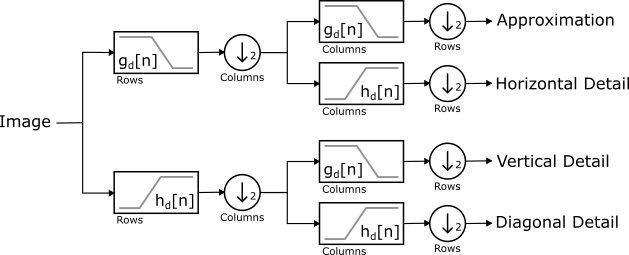
Decomposition Block Diagram
Reconstruction
Image reconstruction revserses the signal flow, uses the reconstruction kernels \(g_r[n]\) and \(h_r[n]\), and upsamples instead of downsampling.
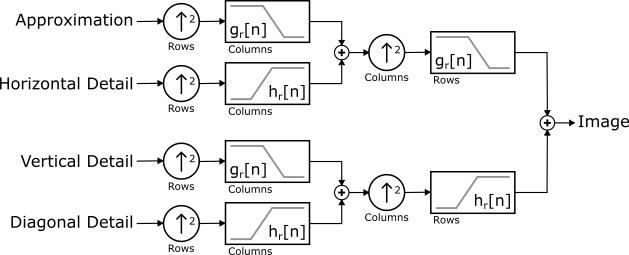
Reconstruction Block Diagram
Accessing Filter Bank Kernels
For some wavelet
Wavelet wavelet = ...;
the decomposition kernels are
wavelet.filter_bank().decompose_kernels().lowpass();
wavelet.filter_bank().decompose_kernels().highpass();
and the reconstruction kernels are
wavelet.filter_bank().reconstruct_kernels().lowpass();
wavelet.filter_bank().reconstruct_kernels().highpass();
Properties
Each wavelet object has a name() and family() name.
Whenever possible, the name() uniquely identifies the filter bank
used to define the wavelet. This is true for all predefined wavelets.
Wavelets have the additional properties:
Predefined Wavelets
The following predefined wavelets can be constructed by the indicated
factory or by Wavelet::create() using one of the indicated names.
- Haar
Factory:
create_haar()Names: haar
- Daubechies
Factory:
create_daubechies()Names: db1, db2, …, db38
- Symlets
Factory:
create_symlets()Names: sym2, sym3, …, sym20
- Coiflets
Factory:
create_coiflets()Names: coif1, coif2, …, coif17
- Biorthogonal
Factory:
create_biorthogonal()- Names:
bior1.1
bior1.3
bior1.5
bior2.2
bior2.4
bior2.6
bior2.8
bior3.1
bior3.3
bior3.5
bior3.7
bior3.9
bior4.4
bior5.5
bior6.8
- Reverse Biorthognal
Factory:
create_reverse_biorthogonal()- Names:
rbior1.1
rbior1.3
rbior1.5
rbior2.2
rbior2.4
rbior2.6
rbior2.8
rbior3.1
rbior3.3
rbior3.5
rbior3.7
rbior3.9
rbior4.4
rbior5.5
rbior6.8
Custom Wavelets
Custom wavelets are created by providing a FilterBank constructed
directly from four kernels or by one of the factory functions:
It is encouraged, but not required, that each wavelet is given a
name() and family(). If possible, the name should uniquely
identify the filter bank. See the naming schemes used for the builtin wavelets
for examples.
Create a wavelet from filter bank kernels.
cv::Mat decomposition_lowpass_kernel = ...;
cv::Mat decomposition_highpass_kernel = ...;
cv::Mat reconstruction_lowpass_kernel = ...;
cv::Mat reconstruction_highpass_kernel = ...;

auto filter_bank = FilterBank(
    decomposition_lowpass_kernel,
    decomposition_highpass_kernel,
    reconstruction_lowpass_kernel,
    reconstruction_highpass_kernel
);

auto wavelet = Wavelet(filter_bank, "myname", "My Family");
Or equivalently, use the convienence Wavelet constructor to skip
creating the filter bank directly.
// The filter bank is built internally.
auto wavelet = Wavelet(
    decomposition_lowpass_kernel,
    decomposition_highpass_kernel,
    reconstruction_lowpass_kernel,
    reconstruction_highpass_kernel,
    "myname",
    "My Family"
);
When a wavelet is constructed from four filter kernels, it is up to the user to
ensure that the wavelet is well defined. The satisfies_alias_cancellation(),
satisfies_no_distortion(), is_biorthogonal(), and
is_orthogonal() functions may be helpful in this regard.
Orthogonal Wavelets
Use the FilterBank::create_orthogonal() factory to create an
orthogonal wavelet from a reconstruction lowpass kernel.
cv::Mat reconstruction_lowpass_kernel = ...;
auto filter_bank = FilterBank::create_orthogonal(reconstruction_lowpass_kernel);

auto wavelet = Wavelet(filter_bank, "myname", "My Family");
Or equivalently, use the convienence Wavelet constructor to skip
creating the filter bank directly.
// The filter bank is built internally using FilterBank::create_orthogonal.
auto wavelet = Wavelet(reconstruction_lowpass_kernel, "myname", "My Family");
FilterBank::create_orthogonal() normalizes the kernel using the L2
norm before creating a conjugate mirror filter bank and ensuring that the filter
bank is_orthogonal().
Use FilterBank::create_conjugate_mirror() to avoid the normalization
and the is_orthogonal() check.
Biorthogonal Wavelets
Use the FilterBank::create_biorthogonal() factory to create a
biorthogonal wavelet from a pair of reconstruction and decomposition lowpass
kernels.
cv::Mat reconstruction_lowpass_kernel = ...;
cv::Mat decomposition_lowpass_kernel = ...;
auto filter_bank = FilterBank::create_biorthogonal(
    reconstruction_lowpass_kernel,
    decomposition_lowpass_kernel
);

auto wavelet = Wavelet(filter_bank, "myname", "My Family");
Or equivalently, use the convienence Wavelet constructor to skip
creating the filter bank directly.
// The filter bank is built internally using FilterBank::create_biorthogonal.
auto wavelet = Wavelet(
    reconstruction_lowpass_kernel,
    decomposition_lowpass_kernel,
    "myname",
    "My Family"
);
FilterBank::create_biorthogonal() normalizes the kernel using the L2
norm by before creating a quadrature mirror filter bank and ensuring that the
filter bank is_biorthogonal().
Use FilterBank::create_quadrature_mirror() to avoid the normalization
and the is_biorthogonal() check.
Constructing Custom Wavelets By Name
Providing support for creating custom wavelets by name is straightforward -
simply implement a wavelet factory and register each possible parameter set
with Wavelet::register_factory().
For example, the predefined Daubechies wavelets are registered at startup
using code equivalent to the following.
for (int order = 1; order < 39; ++order)
    Wavelet::register_factory(create_daubechies, order);
So that creating a 4th order Daubechies wavelet by name is done with
Wavelet db4_wavelet = Wavelet::create("db4");
Under the hood, std::bind() binds order to create_daubechies()
and uses the name() of the wavelet (e.g. “db1”) as the factory name.
Follow this approach whenever the wavelet name() uniquely identifies an
entire set of factory parameters.
If, however, it is impossible or inpractical to enumerate all possible sets
of factory parameters, or the wavelet name() does not uniquely identify the
filter_bank(), use the version of
Wavelet::register_factory()
that takes a factory name and registers a factory that accepts unbound
parameters at creation.
API Reference