Discrete Wavelet Transform (DWT)
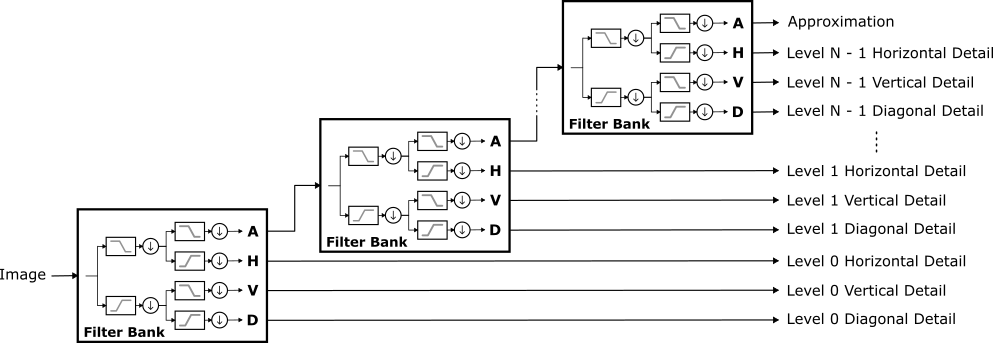
Discrete Wavelet Transform Block Diagram
Image decomposition (i.e. analysis or forward transformation) is performed
by decompose().
#include <wtcv/dwt2d.hpp>
using namespace wtcv;

cv::Mat image = ...;
DWT2D dwt(Wavelet::create("db2"));
DWT2D::Coeffs coeffs = dwt.decompose(image);
Alternatively, DWT2D objects are functors.
DWT2D::Coeffs coeffs = dwt(image);
A third option is the functional interface.
DWT2D::Coeffs coeffs = dwt2d(image, "db2");
Image reconstruction (i.e. synthesis or inverse transformation) is
accomplished with reconstruct()
cv::Mat reconstructed_image = dwt.reconstruct(coeffs);
or DWT2D::Coeffs::reconstruct().
cv::Mat reconstructed_image = coeffs.reconstruct();
Coefficients
This DWT2D::Coeffs is a view onto a cv::Mat containing the DWT coefficients.
The coefficients at each decomposition level are comprised of three
submatrices: the horizontal detail subband, the vertical detail subband,
and the diagonal detail subband.
There is a single submatrix of approximation coefficients stored
alongside the coarsest details.
Smaller level indices correspond to smaller scales (i.e. higher
resolutions). The submatrices are layed out as (a 4-level decomposition
is shown for illustration):
The regions labeled H0, V0, and D0 are the level 0 (i.e. finest) horizontal, vertical, and diagonal detail subbands, respectively. Likewise, H1, V1, and D1 are the level 1 coefficients, H2, V2, and D2 are the level 2 coefficients, and H3, V3, and D3 are the level 3 (i.e. coarsest) coefficients. The approximation coefficients are labeled A.
Constructing DWT2D::Coeffs Objects
DWT2D::Coeffs objects are created by one of the following methods:
Computed by
DWT2D::decompose()Cloned by
clone(),empty_clone(), orclone_and_assign()Created by
DWT2D::create_coeffs()orDWT2D::create_empty_coeffs()
The third method is less common and is only used when the coefficients are generated algorithmically (as opposed to transforming an image).
The only caveat is that default constructed DWT2D::Coeffs can be used as
DWT2D::decompose() or dwt2d() output parameters.
cv::Mat image = ...;
DWT2D::Coeffs coeffs;
// Coefficients are passed as an output parameter.
dwt2d(image, coeffs);
But, this can be accompished with
cv::Mat image = ...;
// Coefficients are returned.
DWT2D::Coeffs coeffs = dwt2d(image);
The performance should be comparable because DWT2D::Coeffs are moveable.
The difference is a matter of style. The first method is more
idiomatic of OpenCV code while the second is a bit more succinct.
Interoperability With OpenCV
Converting Between cv::Mat And DWT2D::Coeffs
DWT2D::Coeffs objects are implicitly converted to cv::Mat.
DWT2D::Coeffs coeffs = ...;

// DWT2D::Coeffs can be assigned to a cv::Mat.
cv::Mat matrix = coeffs;

// Functions that accept a cv::Mat also accept a DWT2D::Coeffs.
void foo(const cv::Mat& matrix) {...}
foo(coeffs);
Warning
Converting a DWT2D::Coeffs to a cv::Mat discards the metadata
that defines the subband submatrices and the associated DWT2D.
// The matrix has the same numerical data but can no longer be used as
// a DWT2D::Coeffs because the metadata has been lost.
cv::Mat matrix = coeffs;
Warning
Converting a DWT2D::Coeffs to a cv::Mat returns the private
cv::Mat member. Since cv::Mat objects share the underlying data,
any modification of the matrix is a modification of the coefficients.
// Be careful, matrix and coeffs share the same data.
// This sets all matrix elements and coefficients to zero.
cv::Mat matrix = coeffs;
matrix = 0.0;
Converting a cv::Mat to a DWT2D::Coeffs is done in one of two ways -
in each case an existing DWT2D::Coeffs object is required to provide the
necessary metadata.
Use
clone_and_assign()on the existing coefficientsauto new_coeffs = coeffs.clone_and_assign(matrix);
Assignment to the existing coefficients
coeffs = matrix;
Calling OpenCV Functions
DWT2D::Coeffs objects are implicitly converted to
cv::InputArray, cv::OutputArray, and cv::InputOutputArray. In each case the
array is initialized with the private cv::Mat member. Since cv::Mat objects share the
underlying data, any modification of the array’s matrix is a
modification of the coefficients. This means that DWT2D::Coeffs can be
passed to any OpenCV function and acted on like a normal cv::Mat.
Output Arguments
Many OpenCV functions return their result via an output argument. Consider the taking the log:
cv::Mat log_coeffs;
cv::log(coeffs, log_coeffs);
This does correctly compute log_coeffs, but it loses the DWT2D::Coeffs
metadata.
To make log_coeffs a DWT2D::Coeffs, and not just a cv::Mat,
initialize it with empty_clone().
DWT2D::Coeffs log_coeffs = coeffs.empty_clone();
cv::log(coeffs, log_coeffs);
API Reference